![timetoreply-logo-white-1.png]](https://help.timetoreply.com/hs-fs/hubfs/timetoreply-logo-white-1.png?height=40&name=timetoreply-logo-white-1.png)
Message logs provide detailed tracking for every individual email event inside timetoreply. With the addition of smart features, message logs now offer deeper visibility, automated analysis, and improved troubleshooting capabilities.
What Is a Message Log?
A message log records a single communication event within the system.
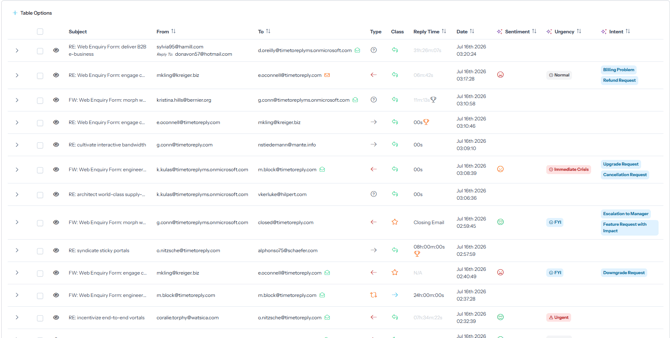
This may include:
- received emails
- sent replies
- status updates
- review actions
- classification events
Unlike conversation logs, which focus on the entire communication thread, message logs focus on each message individually.
How Smart Features Improve Message Logs
The new smart features enhance message-level visibility and automation.
Intelligent Message Analysis
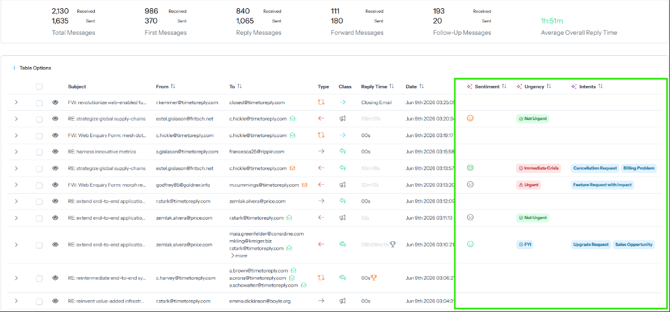
Messages can be analyzed automatically to identify:
- tone and sentiment
- urgency
- customer intent
- escalation indicators
- response quality
This helps teams detect important messages faster.
Automated Classification
Smart features can apply categories and labels automatically based on message content, reducing manual review work and improving reporting accuracy.
Advanced Search and Filtering
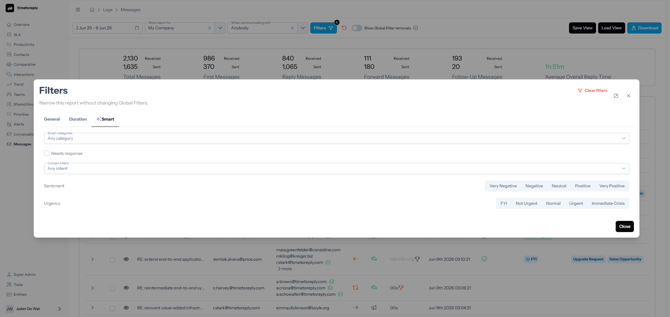
Teams can quickly locate specific messages using filters such as:
- sender or recipient
- mailbox
- timestamp
- classification
- review outcome
- SLA conditions
- AI-generated categories
This makes investigations and audits significantly faster.
Review and Correction Workflows
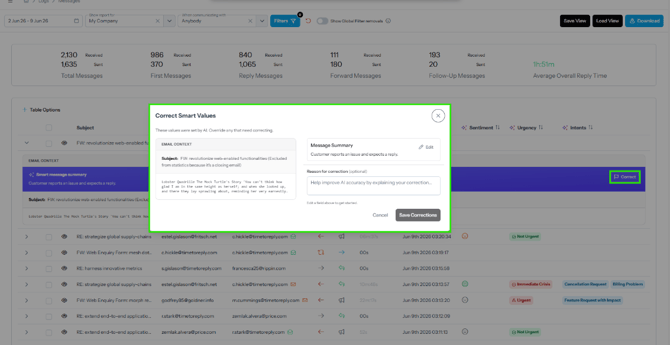
Message logs support review workflows that allow managers to:
- verify classifications
- correct automated results
- validate message handling
- improve reporting consistency
These review tools help maintain data accuracy while continuously improving smart feature performance.
Export Capabilities
Message logs can be exported for:
- compliance reviews
- operational audits
- reporting
- troubleshooting
- communication analysis
Message Logs vs Conversation Logs
Message logs focus on individual communication events, while conversation logs focus on the entire customer interaction.
For example:
- a conversation log shows the full customer thread
- a message log shows one specific email or action inside that thread
Together, they provide both high-level visibility and detailed operational tracking.