![timetoreply-logo-white-1.png]](https://help.timetoreply.com/hs-fs/hubfs/timetoreply-logo-white-1.png?height=40&name=timetoreply-logo-white-1.png)
Conversation logs give teams a complete view of customer interactions across an entire email thread. With Time To Reply’s smart features, conversation logs become more than a communication history, they become a searchable, reviewable, and actionable workspace for managing customer conversations at scale.
What Is a Conversation Log?
A conversation log combines all related emails and replies into a single threaded history. Instead of reviewing messages individually, teams can follow the entire customer journey in one place.
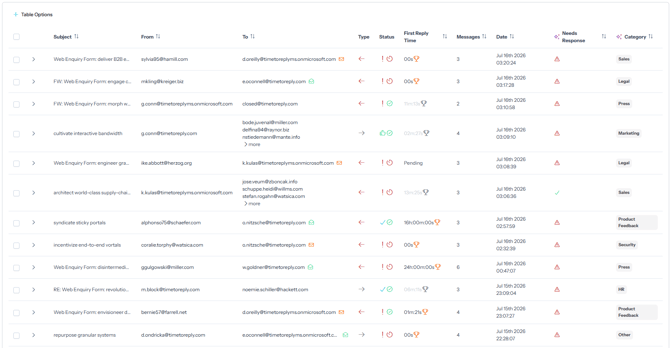
This includes:
- incoming and outgoing emails
- response timelines
- ownership changes
- SLA tracking
- internal collaboration activity
- review status
- AI-generated insights
Conversation logs help teams quickly understand context, identify unresolved issues, and monitor communication quality.
How Smart Features Improve Conversation Logs
The new smart features add automation and intelligence to conversation tracking.
Smart Conversation Detection
Smart features automatically group related emails into the correct conversation thread. This reduces manual sorting and helps teams avoid fragmented communication histories.
AI-Powered Classification
Conversations can be categorized automatically based on:
- sentiment
- urgency
- topic
- customer intent
- escalation risk
This makes it easier to prioritize important conversations and route them to the correct teams.
Smart Search and Filtering
Teams can quickly find conversations using advanced filters such as:
- response performance
- review status
- unresolved threads
- tagged categories
- mailbox activity
- SLA conditions
This improves visibility across high-volume inboxes.
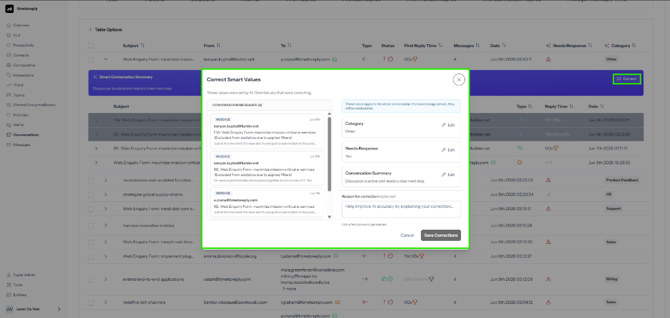
Review and Quality Monitoring
Managers can review conversations directly within the log, helping teams:
- maintain communication standards
- identify coaching opportunities
- verify compliance
- track review outcomes
Export and Reporting
Conversation logs can also support reporting and exports for:
- operational analysis
- audits
- performance reviews
- customer service reporting
Why Conversation Logs Matter
With smart features enabled, conversation logs become a central source of truth for customer communication. Teams can reduce response delays, improve collaboration, and gain deeper visibility into customer interactions without manually reviewing every email thread.